Skip to content
ALL THE GEAR, NONE OF THE GUILT

Some Things Are Worth Owning. Most Aren’t.

Enjoy cameras and consoles without the pains of owning them — no maintenance, no storage, no full price for something you'll only need for a while.

Why Rentl

Responsible stewardship, not hoarding.

Rentl is a small rental service with students on the team. Cameras, lenses, lights, and kits you'd never buy for a single project, but that change what you can make when they're yours for a weekend.

Some gear earns a permanent spot in your bag. The rest — the niche, the occasional, the tried-it-once — is where Rentl comes in. Knowing which is which is a skill worth building, and the Rentl Digest is where we get into it.

Read up on smart ownership

Small means it runs on trust. A real person reviews every request, and every rental is backed by a refundable deposit — a safeguard, not a fee. It's there to keep borrowed gear cared for: you get it back when the gear comes back on time and undamaged, ready for the next Rentler. Bring it back the way you'd want to get it.

  • Access over ownership

    Rent what a project needs. Skip the price tag — and the closet full of gear you'll only use twice a year.

  • Run by peers

    Students approve every request. You're borrowing from people, not a vending machine.

  • Care for the kit

    A refundable deposit and a quick check on return keep everything working for the next person.

How it works

Renting, start to finish

Five steps from browsing to bringing it back. No online payments yet — you settle up with an admin in person.

  1. 01Browse

    Sign in to see daily rates and what's free on your dates.

  2. 02Request

    Pick your start and end dates, then submit a rental request.

  3. 03Review

    An admin checks your request, then approves or rejects it by email.

  4. 04Pick up

    Grab your gear around 8 AM on day one and settle your fees.

  5. 05Return

    Return it by 8 AM the day after your end date. Your deposit's back once it's checked in.

Read the full rental policy

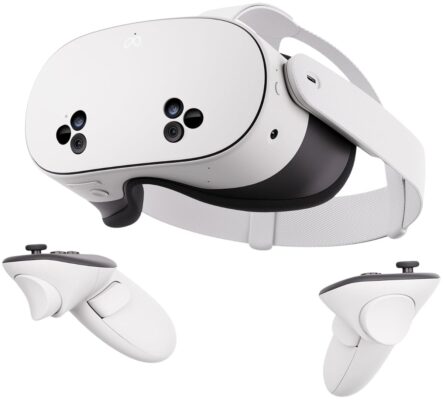
Meta Quest 3S
Gaming

A fully standalone VR headset — no PC, no console, no wires running to anything. Put it on, and the room around you either disappears into a game world or stays right there in full color, mixed in with it. Imagine this: you put the headset on expecting a normal game, and the passthrough camera keeps your actual bedroom visible the whole time — except now there's a dragon standing in the middle of it. Full-Color Mixed Reality Passthrough. Unlike older VR headsets that cut you off from the world completely, the Quest 3S blends game elements directly into a live view of your actual room — genuinely different from anything screen-based. Fully Standalone, Nothing Else Required. No PC, no console, no external sensors to mount around the room — the headset alone runs everything, and setup is putting it on and following the prompts. Inside-Out Tracking. The headset tracks its own position and your controllers using its own cameras, so there's nothing to install anywhere else in the room before playing. 128GB Storage. Enough room for a real library of games and apps installed at once, no need to constantly uninstall one thing to fit another. Snapdragon XR2 Gen 2 with 8GB RAM. The same chip generation powering the standard Quest 3, handling fast-paced games and mixed reality tracking without the headset needing to be tethered to outside hardware. Two Touch Plus Controllers Included. A controller for each hand, ready to go out of the box — batteries already inside, nothing extra to buy before the first session. https://www.youtube.com/shorts/6M1i7Ypruy8 Manual Best Free Quest 3S Games to Start With

Log in to see pricing
View Details →
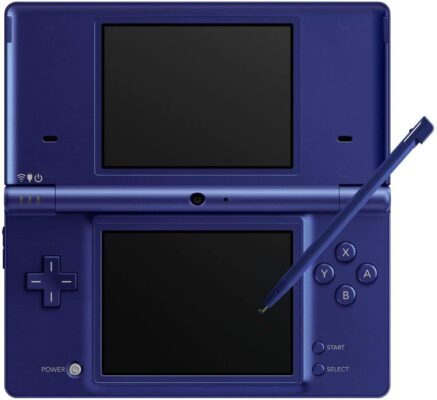
Nintendo DSi (Metallic Blue)
Gaming

Everything that made the DS Lite work, plus two built-in cameras and a proper menu system — the DSi was Nintendo's handheld growing up, adding photo and sound tools on top of an already-massive game library. Imagine this: a group photo that comes out looking nothing like anyone in it, on purpose, because the built-in camera app has a mode specifically for warping faces into something ridiculous. This DS is shared between renters, so it comes with two small tools: Rentl User Manager — keeps everyone's save files separate Rentl Backup Tool — backs your saves up to a PC, and can restore them any time you need to Both guides are in your account menu once you're logged in. Dual Built-In Cameras. One inner-facing, one outer-facing, with eleven distortion effects built into the camera app — face-morphing, mirroring, stretching — a genuinely different kind of photo booth years before that became a phone-app trend. Larger Screens Than DS Lite. Both screens grew to 3.25 inches at the same 256x192 resolution, a small but noticeable step up in visibility. 256MB Internal Storage Plus SD Card Slot. Save DSiWare downloads, photos, and music directly to the system, or expand with an SD card up to 32GB — the DS Lite had no internal storage at all. Five-Level Adjustable Brightness. An extra brightness step over the DS Lite's four, trading screen visibility against the up-to-14-hour battery life at the dimmest setting. Still Plays the Full DS Library. Every standard DS Game Card works exactly as it did on DS Lite — the only backward-compatibility loss is the DS Lite's Game Boy Advance slot, dropped to make room for the second camera. https://www.youtube.com/shorts/HBjarcMUNOo 10 Great DS Games Still Worth Playing

Log in to see pricing
View Details →
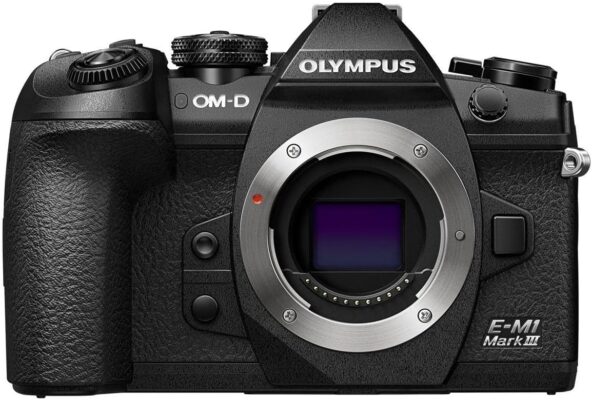
Body Only Olympus OM-D E-M1 Mark III Mirrorless Camera
Cameras

A professional-grade Micro Four Thirds mirrorless camera built for photographers who need pro-level performance in a body they can actually carry all day. Imagine this: you're the only one covering the event, but the org wants both — an aftermovie for social media and clean photos for the yearbook, shot back to back with no time to swap cameras. That's exactly what this camera is built for: pro-grade 4K video and serious still-photo performance from the same body, so you're not choosing between the moment and the motion. 20.4MP Sensor and TruePic IX Processor. The E-M1 Mark III pairs its Four Thirds sensor with Olympus's TruePic IX processor — the same engine used in the flagship E-M1X — for fast, accurate face and eye detection. Native ISO runs 200-25600, giving it real flexibility from bright daylight through dim indoor venues. 5-Axis In-Body Stabilization. Built-in sensor-shift stabilization compensates for up to 7 stops of camera shake on its own — up to 7.5 stops when paired with a compatible Sync IS lens — making sharp handheld shots possible well below the shutter speeds a tripod would normally demand. 121-Point Cross-Type Autofocus. Every autofocus point on the E-M1 Mark III is cross-type and covers the full frame, so fast-moving subjects stay locked in whether they're centered or near the edge. Continuous shooting hits up to 60fps with the electronic shutter or 15fps mechanically. 4K Video and Silent Shooting. DCI/UHD 4K recording tops out at 60fps, and the fully silent electronic shutter makes the camera useful in settings — recitals, ceremonies, quiet interviews — where a mechanical shutter's click would be a problem. Weather-Sealed Body Design. A magnesium-alloy shell sealed against dust, splashes, and freezing temperatures means the camera can handle real outdoor conditions, not just fair-weather shooting. The 3-inch fully articulating touchscreen and 2.36M-dot OLED viewfinder cover both handheld and tripod-mounted shooting comfortably. Storage and Battery. Dual UHS-II SD card slots let you shoot to both simultaneously for backup, or split stills and video across them. The BLH-1 battery is rated for roughly 420 shots per charge — plan on a spare for a full day out. https://www.youtube.com/watch?v=sDTGtJL0awg Manual See Real Photos Shot on This Camera (Flickr Gallery) Setup Tutorial — Get Every Menu Dialed In

Log in to see pricing
View Details →